Publishing
Turn Articles Into Videos: Voicgen Now Does Video
Until now, Voicgen did one transformation: your article became audio. A reader could press play and listen instead of reading. That’s still the core of the product — but as of this release, the same article can become something else too: a short, captioned, vertical video ready for the platforms where your audience actually spends […]
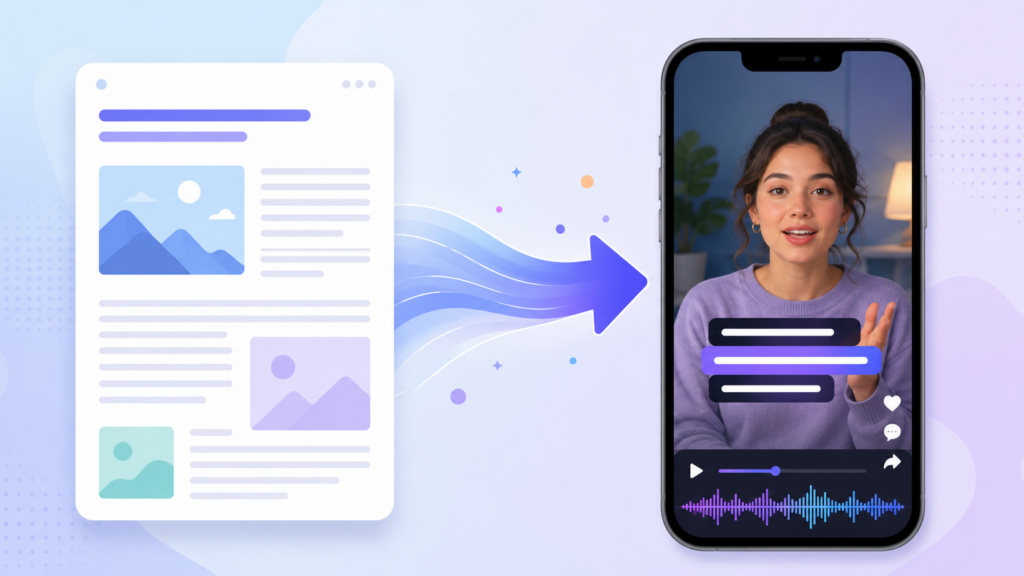
Until now, Voicgen did one transformation: your article became audio. A reader could press play and listen instead of reading. That’s still the core of the product — but as of this release, the same article can become something else too: a short, captioned, vertical video ready for the platforms where your audience actually spends its time.
Publish an article, get a 60-second social video. Here’s what that means in practice, and why we built it.
What the video feature does
You give Voicgen an article — the same way you already do for audio. It produces a short vertical video (9:16, the native format for Reels, TikTok, and YouTube Shorts) that:
- Narrates a condensed version of the article in the same natural voices you already use for audio, so your video content sounds like your audio content
- Shows karaoke-style captions — words highlighting in sync with the narration, the caption style that social platforms have made standard, because most social video gets watched with the sound off at least at first
- Pairs the narration with relevant visuals selected to match what’s being said, scene by scene, so the video looks produced rather than like a slideshow
- Comes out at roughly 60 seconds — long enough to carry the article’s core point, short enough that people finish it
The output is a standard MP4 you can download and post anywhere, or grab from your dashboard alongside the audio version of the same article.
Why we built it
Two things kept coming up with the publishers we work with.
The first is that social is where discovery happens now, and social wants video. A great article with no video presence is invisible on the platforms where new readers are actually found. But producing social video the manual way — scripting, recording, editing, captioning — costs more time per clip than most publishing teams have, which is why most articles never get one.
The second is that the article already contains everything the video needs. The argument, the hook, the key point — it’s all written. What was missing was the transformation step, and that’s exactly the kind of step that should be automated. You’ve already done the hard part by writing the piece.
So the feature follows the same principle as everything else in Voicgen: you publish once, and the formats multiply from there. Text becomes audio. Now text becomes video too.
How it works under the hood, briefly
For those who like to know what’s happening: the article is first condensed into a short narration script — the same summarisation approach we use for audio summaries, tuned for spoken pacing. That script is voiced with the TTS voice of your choice. The narration is then broken into scenes, each scene gets matched with fitting visuals, captions are generated word-synced to the audio, and the whole thing is rendered in the cloud into a finished MP4. No rendering happens on your machine, and there’s nothing to install.
A 60-second video typically takes a couple of minutes to render. You’ll see it appear in your dashboard when it’s ready.
What it’s good for
The honest use cases, based on how early users are applying it:
Promoting articles on social. The obvious one. Every substantial article gets a video teaser that drives people back to the full piece. This is the workflow the feature was designed around.
Keeping social feeds alive without a video team. A publisher posting three articles a week now has three Reels a week, with no extra production effort. Consistency on social is mostly what wins, and consistency is exactly what automation is good at.
Repurposing the archive. Your best older articles can become video without anyone re-reading them and writing scripts. A back catalogue of a hundred posts is suddenly a content pipeline.
And where it’s not the right tool: this is not a replacement for genuinely produced video — interviews, documentary-style pieces, anything where the footage itself is the story. It’s the video equivalent of what audio narration is to a written piece: a faithful, automatic transformation of content you already made. That’s a specific job, and it’s the one it does well.
Video minutes and pricing
Video rendering is metered separately from audio, as video minutes on your plan — and generating a video from an article never double-charges you for the audio narration inside it. If you’ve already generated audio for an article, turning it into a video doesn’t consume audio minutes again. Details are on the pricing page, and video minutes are included in paid plans.
Try it on one of your articles
The feature is live in your dashboard now. Pick an article — ideally one with a clear central point, since those condense best — generate a video, and post it where your audience is. The whole test costs you about three minutes.
If you’re not on Voicgen yet, the features page has the full picture of what the platform does, video included.
FAQ